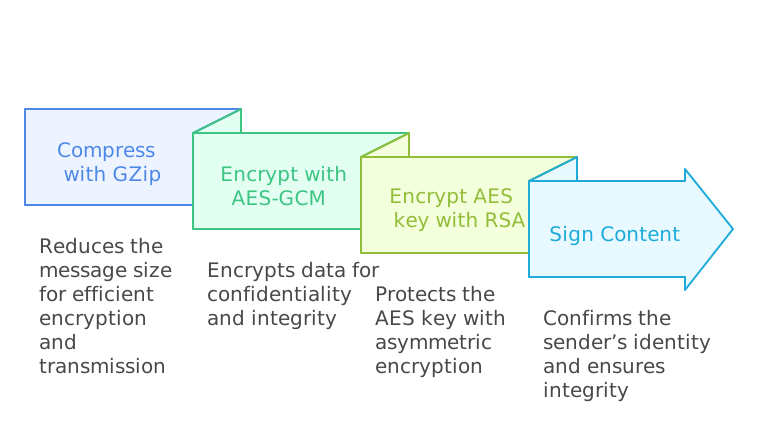
When institutions submit data to Legemiddelregisteret, it must be sent in a SignertKryptertBundle. This is created by compressing the LegemiddelregisterBundle, then encrypting and signing the content.
This page describes how to create a SignertKryptertBundle for Legemiddelregisteret’s API. Implementation details such as language and libraries are up to you, as long as the result conforms to the specification below.
Example code for generating a SignertKryptertBundle: Example in C#
1. Create the FHIR resource
First, create a JSON representation of the FHIR resource LegemiddelregisterBundle.
Use standard or third-party FHIR libraries if desired. It is important that the JSON structure is correct for the FHIR standard so that validation in Legemiddelregisteret’s API does not fail. It is recommended to validate the FHIR resource locally before encryption to prevent messages from failing on the server.
2. Compress with GZip
To reduce bandwidth and ensure that the encryption process is efficient, the data must be GZip-compressed. The result is a byte array of compressed data. GZip uses the DEFLATE algorithm and is a standardised and well-tested method.
In Java, you can typically use classes from java.util.zip. In .NET, equivalent functionality is available in System.IO.Compression.
The result after GZip compression must be a byte array containing the compressed FHIR JSON.
3. Encrypt with AES-GCM (256-bit key)
- Generate AES key and nonce
- The key must be 256 bits (32 bytes).
- The
nonce(initialisation vector) must be 96 bits (12 bytes). It must be generated randomly each time an encryption is performed.
- Encrypt with AES-GCM
- Encrypt the compressed byte array with AES-GCM. In Java, this is available via AES/GCM/NoPadding, while in .NET it is available via e.g. AesGcm (from .NET 5/6 and later).
- Note that AES-GCM will generate an authentication tag (typically 128 bits = 16 bytes).
- From the encryption you get:
encryptedContent(the cipher text)authenticationTag(used to validate that the content has not been altered)
- AES-256-GCM provides both confidentiality (encryption) and integrity (authentication tag) without the need for a separate HMAC.
4. Encrypt the AES key with RSA (Legemiddelregisteret’s public key)
The 256-bit AES key from step 3 is encrypted with Legemiddelregisteret’s public RSA key. This is available in the certificates that can be downloaded here.
The algorithm must be RSA OAEP with SHA-256 (RSAEncryptionPadding.OaepSHA256). The result is a byte array encryptedKey.
The Legemiddelregisteret’s public RSA key is obtained from Legemiddelregisteret’s enterprise certificate. The thumbprint of the certificate used must be specified as encryptionCertificateThumbprint in the SignertKryptertBundle.
5. Sign encrypted content (sender’s private key)
For Legemiddelregisteret to be certain that the content actually comes from the correct organisation (integrity and authenticity control), the message must be signed:
- Find the sender’s private key
- The sender uses their certificate (with the associated private key) for signing.
- The sender’s certificate also has a unique thumbprint, which must be provided in the message as
signatureCertificateThumbprint.
- Create a hash of the encrypted content
- Use SHA-256 to create a hash of
encryptedContent.
- Use SHA-256 to create a hash of
- Sign the hash (RSA-PKCS1-v1.5)
- Use the private key of the sender’s certificate for the signature.
- The result is stored as a byte array in
signature.
- Provide the sender’s organisation identifier
- This is an OID or other identifier linked to the sender’s certificate.
- The server will verify that the sender’s certificate (given by
signatureCertificateThumbprint) actually has this organisation identifier.
6. Create and populate the SignertKryptertBundle object
All fields must be assembled into a JSON object in exactly the order shown below. Binary data is converted to Base64 strings.
| Field | Type | Description |
|---|---|---|
| messageId | string | Unique identifier for the message. Preferably a UUID. |
| senderOrganizationIdentifier | string | Sender’s organisation ID or OID (usually the organisation number) that must match the certificate used for signing. |
| messageFormatVersion | string | Current message format version: "1.0". |
| rapporteringFra | string | Start timestamp of the period from which the data was retrieved. Must be in Norwegian local time formatted according to ISO 8601, for example: 2025-01-22T10:30:00Z |
| rapporteringTil | string | End timestamp of the period from which the data was retrieved. Must be in Norwegian local time formatted according to ISO 8601. |
| encryptedContent | string | AES-GCM-encrypted content (FHIR resource compressed and encrypted). Provided as a Base64-encoded string. |
| encryptionCertificateThumbprint | string | Thumbprint of the certificate used for encryption. |
| encryptedKey | string | AES key encrypted with Legemiddelregisteret’s public RSA key. Provided as a Base64-encoded string. |
| nonce | string | 96-bit nonce (12 bytes) used in AES-GCM encryption. Provided as a Base64-encoded string. |
| authenticationTag | string | 128-bit (16 bytes) authentication tag from AES-GCM. Provided as a Base64-encoded string. |
| signatureCertificateThumbprint | string | Thumbprint of the sender’s certificate (with the associated private key used for signing). |
| signature | string | Signature (RSA-PKCS1-v1.5 over SHA-256 hash) of encrypted content. Provided as a Base64-encoded string. |
| generatedAt | string | Timestamp (Norwegian local time) when the message was generated. |